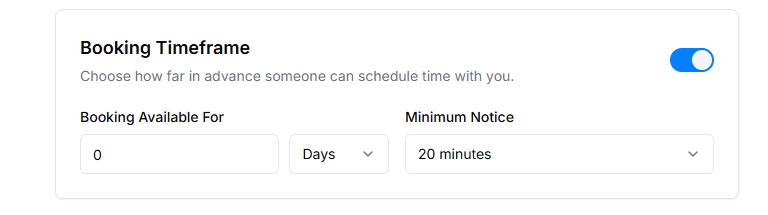
Buffer Time allows you to add extra time before or after a booking to prevent back-to-back appointments. This is useful for preparation, cleanup, breaks, or avoiding schedule overload.
Why Buffer Time Is Important
- Prevents bookings from being scheduled too close together
- Gives staff time to prepare before a meeting or service
- Allows rest or cleanup time after an appointment
- Helps manage schedules more efficiently
When Buffer Time is enabled, the system automatically blocks additional time before and/or after each booking, making that time unavailable for other bookings.
Watch the full video to learn how to manage buffer time in Timetics.ai.
Buffer Time Settings
- Before Event: Adds extra time before a booking starts.
- After Event: Adds extra time after a booking ends.
- Minimum Notice: Sets how much advance notice is required to book.
- Time-slot Intervals: Controls how booking slots are generated; can follow service duration or custom intervals.
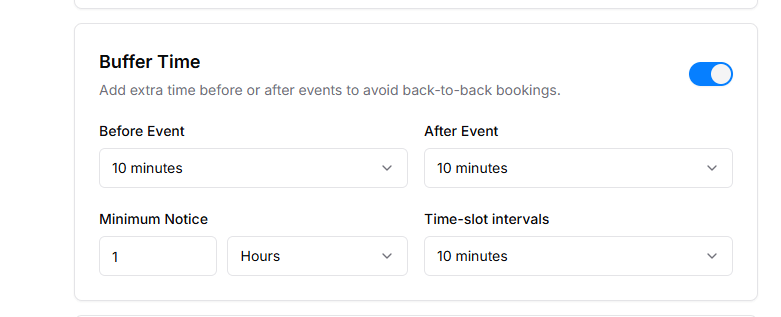
Booking Limit
Control how many bookings a client can make per day, week, or custom period. This prevents overbooking and helps manage schedule efficiently.
How to use:
- Enable Limit toggle in settings
- Enter numbers for each period (e.g., Per Day = 3, Per Week = 15)
- Click Add Another Limit if you want extra limits for different cases
- Changes save automatically, and limits apply immediately
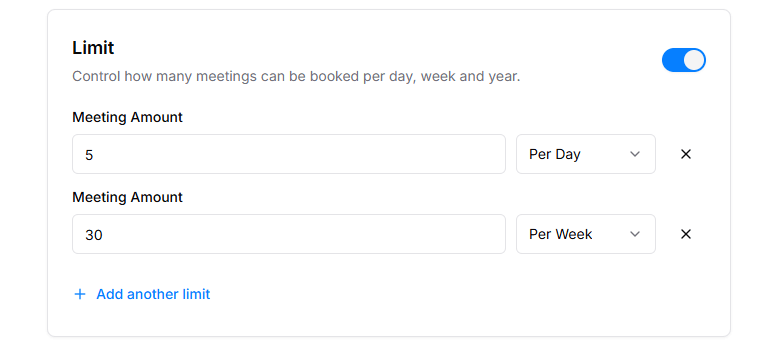
Booking Timeframe
Defines how far in advance clients can book and the minimum notice required. Ensures appointments are booked within allowed windows.
How to use:
- Enable Booking Timeframe toggle
- Set Booking Available For (days/weeks/months)
- Set Minimum Notice (minutes/hours)
- The system blocks bookings outside this timeframe automatically